
Are you looking for an Eye Test App to check your vision at home? The Eye test app by Designveloper provides several simple vision and eye-related screening tests that can help users get a basic idea about their eyesight and decide whether they should consider visiting an eye-care professional.
The app is available on Google Play under the Health & Fitness category and has crossed 1 million+ downloads with a rating of around 4.1 stars based on thousands of user reviews.
Importantly, the app states that its tests are not official medical eye examinations. Results can vary depending on factors such as screen size, brightness, contrast and resolution, so users should not use the app as a replacement for a professional eye examination.
Eye Test App – Overview
| Information | Details |
|---|---|
| App Name | Eye test |
| Category | Health & Fitness |
| Platform | Android |
| App Type | Free with Ads & In-App Purchases |
| Language | English |
| Google Play | Available |
What Is the Eye Test App?
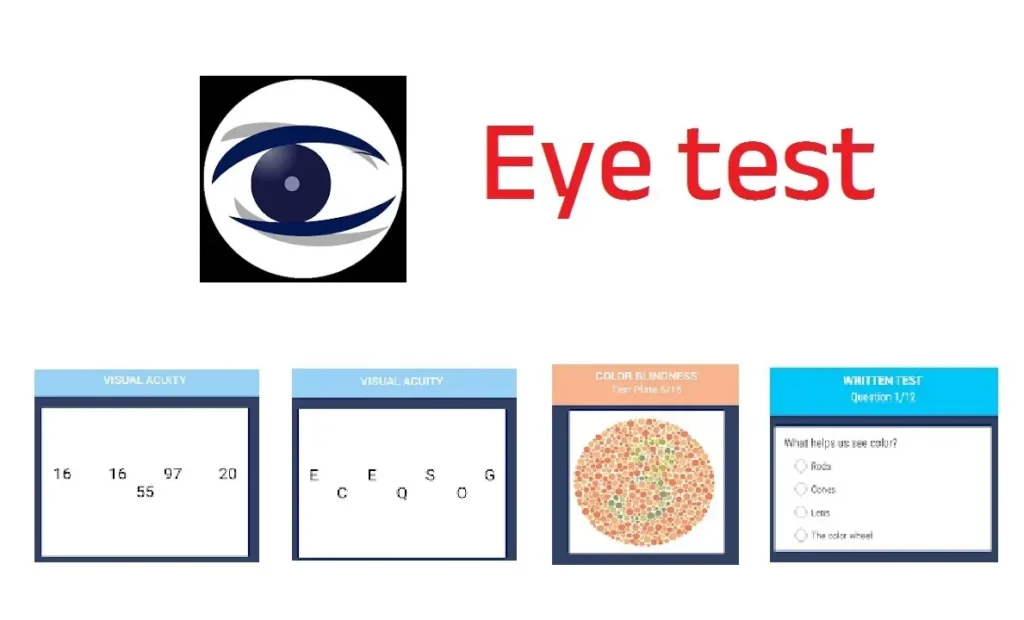
Eye test is an Android application designed to provide users with different types of vision and eye-related tests. Instead of visiting an eye clinic for every basic screening question, users can use the app for an initial self-check at home.
The Google Play listing says the application includes 12 types of eye tests, with a combination of free and Pro tests.
The app can be useful for people who want to learn more about their vision and identify situations where a professional eye examination may be worth considering.
Eye Test App Features
The app provides several different tests and eye-related activities.
1. Visual Acuity Test
The visual acuity test is designed to provide a basic indication of how clearly you can see. Visual acuity is also a routine component of professional eye examinations.
2. Ishihara Color Blindness Test
The Ishihara Color Blindness Test is included to help users perform a basic check of color vision.
It can be useful for people who want to understand whether they may have difficulty distinguishing certain colors.
3. Color Cube Game
The app also includes a Color Cube Game, which combines color recognition with a speed-based activity.
This makes the testing experience more interactive rather than simply presenting traditional vision charts.
4. Amsler Grid Tests
The application includes Amsler Grid tests. An Amsler grid is commonly associated with checking for changes or distortions in central vision.
The app listing specifically describes the Amsler grid in relation to the retina, macula and optic nerve.
5. AMD Test
The Eye Test App also provides an AMD-related test. AMD stands for age-related macular degeneration, a condition affecting the macula and central vision.
The app should only be used as an initial screening tool and not as a method for diagnosing AMD.
6. Glaucoma Survey
Another feature is a Glaucoma Survey. Glaucoma refers to a group of eye diseases that can damage the optic nerve.
Because glaucoma can be a serious eye condition, any concerning result should be discussed with a qualified eye-care professional.
7. Contrast Sensitivity Test
The Contrast Sensitivity Test checks the ability to distinguish between different levels of light and dark.
This can provide additional information beyond a standard visual acuity check.
8. Landolt C and Tumbling E Tests
The app includes Landolt C and Tumbling E tests.
These formats can be particularly useful for visual acuity testing when users have difficulty reading standard letters.
9. Astigmatism Test
The application also offers an Astigmatism Test. Astigmatism can cause blurred or distorted vision at different distances.
The app can provide an initial indication, but only a professional eye examination can properly evaluate an individual’s vision and prescription needs.
10. Duochrome Test
The Duochrome Test is another vision screening feature included in the app. It is intended to provide an estimate related to refractive status.
11. OKN Strip Test
The app includes an OKN Strip Test as part of its collection of eye-related tests.
12. Red Desaturation Test
The Red Desaturation Test is another screening feature available in the application. The app explains that changes in how red objects appear can be associated with certain optic nerve issues.
How to Use the Eye Test App?
Using the app for a basic vision screening is relatively simple.
- Install the Eye test app from Google Play.
- Open the application on your Android smartphone or tablet.
- Select the eye or vision test you want to try.
- Follow the instructions shown on the screen.
- Keep the device at the recommended distance where applicable.
- Complete the test carefully.
- Review the result provided by the application.
- If you notice concerning results or ongoing vision problems, consult an eye-care professional.
The developer notes that screen size, brightness, contrast and resolution can affect test accuracy. The Google Play listing also provides different approximate viewing distances depending on the device size.
Is the Eye Test App Accurate?
The Eye Test App should not be considered a substitute for a professional eye examination.
According to its Google Play description, the accuracy of the tests can be affected by differences between smartphone and tablet displays, including screen size, brightness, contrast and resolution. The developer specifically states that the tests are intended to give users an idea of whether they should see an eye doctor rather than serve as official examinations.
Some user reviews also praise the app for being easy to use, while other reviews raise concerns about the consistency or accuracy of certain results.
Therefore, treat the app as a basic self-screening and educational tool, not as a diagnostic medical device.
Eye Test App Benefits
Some potential benefits of using the app include:
- Convenient basic vision screening at home
- Multiple eye and vision tests in one application
- Visual acuity testing
- Color vision screening
- Amsler grid tests
- Contrast sensitivity testing
- Astigmatism-related screening
- Landolt C and Tumbling E tests
- Simple and interactive testing experience
- Useful information about different aspects of eye health
Who Can Use This Eye Test App?
The app is listed with an Everyone content rating on Google Play.
It may be useful for people who want to perform a basic vision self-check or learn more about different types of vision tests.
However, people experiencing persistent blurred vision, eye pain, sudden changes in vision, flashes, floaters, loss of vision or other concerning symptoms should seek appropriate professional medical care rather than relying on an app.
Important Disclaimer
Eye Test App is not a replacement for a professional eye examination.
The tests available through the application are intended for basic screening and informational purposes. Results may be affected by your device’s display characteristics, viewing distance, lighting conditions and other factors.
Do not use an app-based test to diagnose an eye disease or to change your glasses or contact-lens prescription.
If you receive an unusual result or have concerns about your eyesight, consult a qualified optometrist or ophthalmologist.
Eye Test App on Google Play
The official Eye test app is available through Google Play. It is developed by Designveloper and currently has 1M+ downloads, with ads and in-app purchases listed on its Google Play page.
Official App Link
| Eye Test | Mobile App (Google Play) |
| HomePage | Visit |
Frequently Asked Questions – Eye Test App
Is Eye Test App free?
The Google Play listing identifies the app as containing ads and in-app purchases. It also states that the application offers a combination of free and Pro eye tests.
Can I test my eyesight at home using this app?
Yes. The app is designed to provide several basic vision and eye-related screening tests at home. However, its results should not replace a professional eye examination.
Does the Eye Test App diagnose eye diseases?
No. The developer explicitly states that the tests are not official medical examinations and are intended to provide an indication of whether users may need to see an eye doctor.
Does the app test color blindness?
Yes. It includes an Ishihara Color Blindness Test for basic color vision screening.
Does Eye Test App include an astigmatism test?
Yes. An Astigmatism Test is listed among the available tests.
Final Verdict
The Eye Test App by Designveloper can be a convenient option for people who want to perform a basic vision self-check at home. With multiple tests covering visual acuity, color blindness, Amsler grids, contrast sensitivity, astigmatism and other areas, it offers more than a simple eyesight chart.
However, users should remember that smartphone-based vision tests have limitations. A professional eye examination remains the appropriate way to properly assess eye health, diagnose conditions and determine vision prescriptions.
For a quick and convenient preliminary check, the app can be worth trying, provided its results are interpreted cautiously.
Disclaimer: This article is for informational purposes only and does not provide medical advice, diagnosis or treatment. Always consult a qualified healthcare professional for persistent or concerning eye symptoms.
Ok